← 产品/H1Z1 / KOTK/ROTK External

H1Z1 / KOTK

ROTK External辅助

ROTK External 面向重视隐私与安全的专业玩家和主播。支持在兼容的直播和录制中隐藏叠加层,并提供可调 ESP、瞄准和平滑设置。捕获兼容性取决于录制软件及捕获模式。External 与 Internal 需要分别购买许可证。

Stable performance
Secure loader
Regular updates
24/7 support
ROTK External — Visuals
PANDACHEAT / 03 Private Windows access

访问周期

选择访问周期

仅在付款确认并获得服务器授权后开始计时。

选择访问周期

Instant accessAfter payment

Secure payment银行卡和加密货币

PandaCheat launcherPlug & play

Need help? Contact support

Features

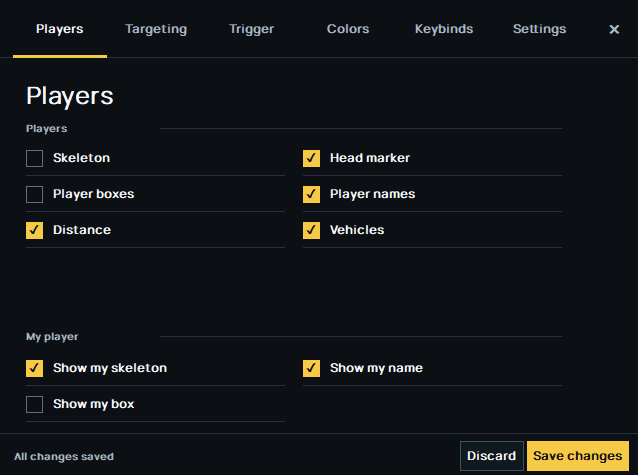
Player & vehicle ESP

Choose the information shown in your overlay.

  • Player skeletons, boxes and head markers
  • Player names and distances
  • Vehicle labels
  • Custom colors, line brightness and thickness

Targeting

Set your activation key and aiming preferences.

  • Keyboard or mouse binding with hold / toggle activation
  • Head, neck or chest selection
  • Adjustable FOV, FOV circle and maximum distance
  • Exact smoothing, target retention and target priority

Prediction

Fine-tune movement prediction.

  • Movement prediction with projectile speed
  • Additional latency and update interval
  • Deadzone and maximum cursor step
  • Live visibility checks are not available in External

Settings

Keep your configuration on this computer.

  • Local configuration with Save / Discard
  • Color picker and editable numeric settings
  • Separate local-player visuals and an overlay hotkey
  • Reload saved settings or reset to defaults

FAQ

常见问题: ROTK External

01如何在 PandaCheat 获取 ROTK 辅助?

创建账户,打开 ROTK 页面,选择访问期限并完成结账。付款确认后,产品会出现在你账户的 PandaCheat Launcher 中。

02ROTK 有哪些访问期限?

ROTK 按访问期限出售:24 小时、7 天和 30 天,部分游戏提供永久选项。当前价格显示在本页和结账页面。

03如何为 ROTK 辅助付款?

可用的付款方式会在结账时显示。付款确认后将自动开通访问。

04使用 ROTK 需要安装什么吗?

只需要 PandaCheat Launcher,一个无需安装的便携文件。登录后选择 ROTK,启动器会自动下载并保持产品更新。

05ROTK 辅助可以在多台电脑上使用吗?

访问权限绑定账户,默认绑定一台设备。你可以在账户页面查看和移除设备;额外设备名额取决于套餐。

06在哪里获取 ROTK 的帮助?

支持通过 PandaCheat Discord 提供。每个版本的兼容性要求和已知限制在购买前列于“兼容性”页面。